
 By Adri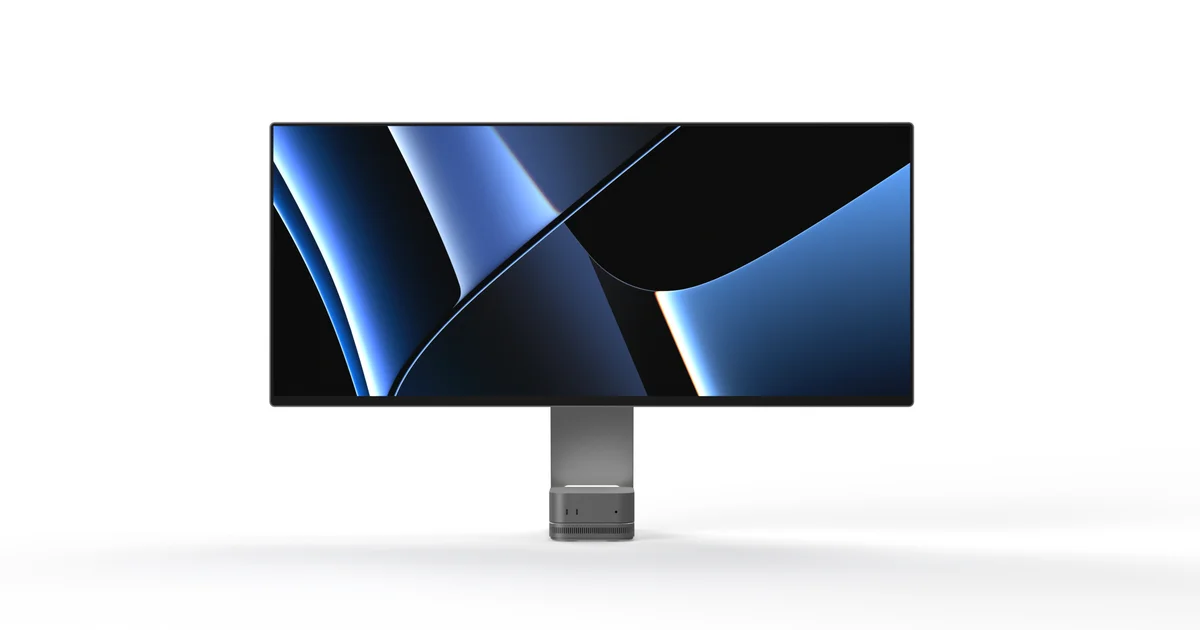
In a Mac mini workstation, the computer itself is not always the component occupying the most desk space.
A monitor, docking station, external storage, card readers and their associated cables can quickly turn a compact setup into a complicated arrangement.
Mobile Pixels wants to combine several of those accessories into one product.
Its Prisma is a 40-inch curved ultrawide display designed to serve as both the visual centerpiece and the connectivity hub of a workstation.
Monitors with integrated USB hubs are not new. Professional displays have offered docking features, KVM switches and additional ports for years.
Prisma's distinctive proposition is the number of functions integrated into a stand designed to hold compact Apple computers.
The project was introduced before October and began crowdfunding on Kickstarter on October 6.
TechRadar revisited the product on October 25, highlighting its limited $999 backing tier and integrated accessories.
However, the monitor is not yet a conventional retail product. Its appeal must be assessed using the manufacturer's published specifications and disclosed limitations.
A 40-inch LG IPS Black panel with 120Hz refresh rate
Prisma's primary feature is its large display area.
Mobile Pixels advertises a 40-inch, 21:9 curved panel with a native resolution of 5120 × 2160 pixels.
That provides more than 11 million pixels and substantial horizontal workspace.
The format can accommodate several application windows without requiring two separate monitors.
A developer might display an editor alongside documentation, while a video editor could allocate more room to a timeline and associated tools.
The actual benefits depend on how the operating system handles window management.
The screen is marketed as 5K2K.
That should not be confused with traditional 5120 × 2880 5K displays, which provide more vertical pixels.
Mobile Pixels specifies an LG IPS Black panel, model LM400RW2-SSA1.
The announced refresh rate is 120Hz, potentially making cursor movement, scrolling and animations smoother than on conventional 60Hz monitors.
Gaming performance requires a more careful assessment.
Prisma is primarily a productivity-oriented IPS display rather than a high-speed OLED gaming monitor.
Wide color coverage needs independent verification
The manufacturer claims 99% coverage of the DCI-P3 color space.
It also specifies peak brightness of 450 cd/m² and HDR10 support.
These features suggest a monitor aimed partly at photography, video and graphics workflows.
However, wide color coverage alone does not establish excellent color accuracy.
Independent measurements would need to examine color errors, brightness uniformity and calibration performance.
The official FAQ also clarifies the display's color depth.
It describes a native 8-bit panel using Frame Rate Control to achieve a wider range of displayed colors.
The advertised reproduction of approximately 1.07 billion colors should therefore not be interpreted as proof of native 10-bit operation.
Such an arrangement can suit many professional applications, but users with strict color requirements should consider their specific workflow.
HDR10 compatibility also needs context.
Accepting an HDR signal does not automatically mean the display delivers the performance of a reference-grade HDR monitor.
There are no independent measurements available for Prisma's final commercial hardware.
The stand physically accommodates a Mac mini or Mac Studio
Prisma's most distinctive feature sits beneath the screen.
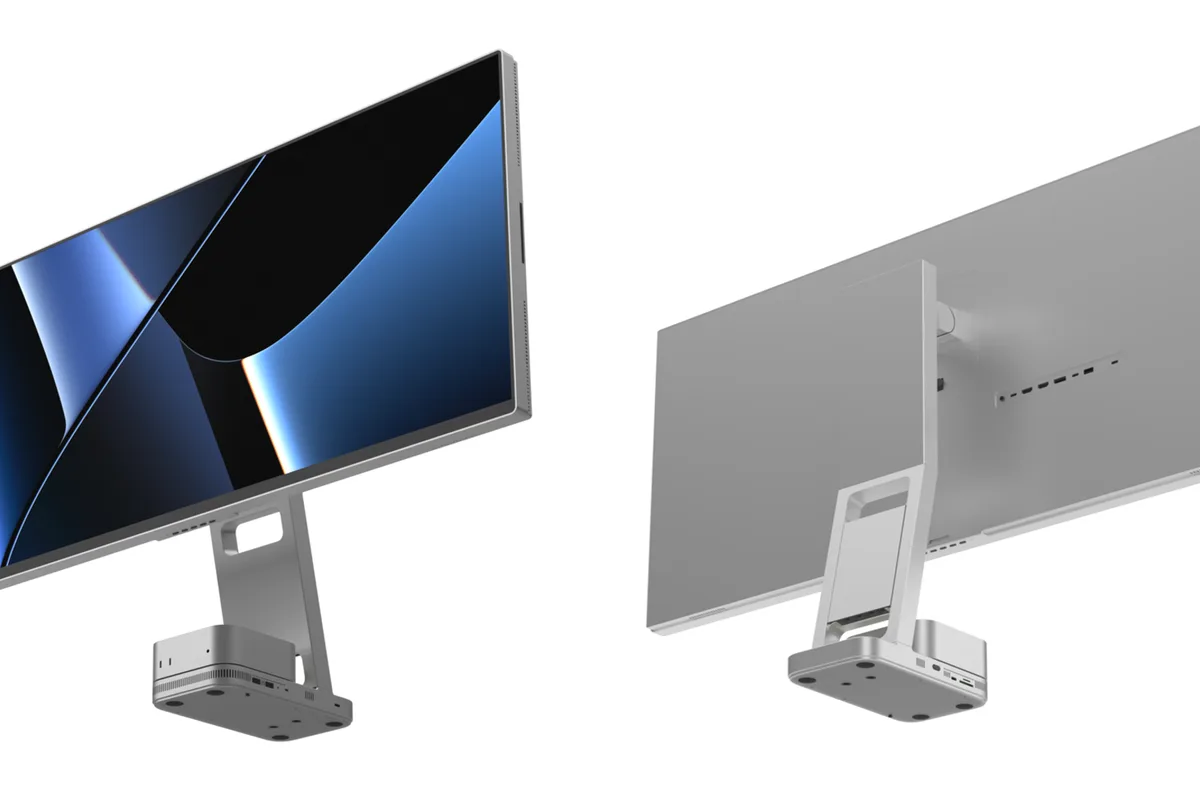
Its stand incorporates a cradle designed to accommodate compact Apple computers, particularly the Mac mini and Mac Studio.
The purpose is to free desk space and reduce the number of surrounding accessories.
An active cooling fan is also integrated into the base.
Mobile Pixels presents the system as a way to assist airflow around the computer placed inside the stand.
Users can choose between low speed, high speed, automatic operation and a complete fan shutdown.
That flexibility matters because workloads and ambient conditions vary.
However, actual thermal improvements remain unproven.
The manufacturer has not published independent comparative measurements showing a Mac mini operating cooler inside the Prisma stand than on an ordinary desk.
It would therefore be premature to claim a verified performance benefit from the cooling system.
The company also describes an acoustic target below 45 dB while noting that final tuning remains in progress.
For users working in quiet environments, measured fan noise will be an important consideration.
An M.2 SSD slot built into the monitor
Another notable feature is storage expansion.
Prisma includes an M.2 NVMe SSD slot.
Users can add external storage without placing a separate SSD enclosure on the desk.
The SSD itself is not included.
Mobile Pixels identifies a PCIe 4.0 x4 interface, but that specification does not describe the full system's effective transfer speed.
Performance is also limited by the controller and the USB connection between the dock and the computer.
The manufacturer expects maximum practical transfer speeds of approximately 900 to 1000 MB/s.
That is much lower than the theoretical bandwidth of an SSD connected directly through PCIe 4.0 x4 inside a computer.
Nevertheless, it could be suitable for file libraries, large documents and some multimedia projects.
It is less attractive for workloads requiring the highest possible external SSD speeds.
The announced figures still require verification using final production hardware.
KVM and Picture-by-Picture support two-computer workflows
Prisma is not limited to Apple computers.
Mobile Pixels confirms compatibility with Windows desktops and laptops, provided they have suitable connections.
The monitor includes a KVM switch.
This allows compatible computers to share peripherals such as a keyboard and mouse.
Someone using a personal Mac and a separate work PC could potentially reduce the number of input devices required.
Picture-by-Picture adds the ability to display two video sources simultaneously.
The two functions should not be confused.
KVM concerns sharing and switching input peripherals, while Picture-by-Picture concerns how video sources appear on the panel.
Mobile Pixels lists both capabilities, but their precise behavior will need testing with different computers and connection arrangements.
Not every feature works through a single USB-C cable
This is one of the most important qualifications in the product documentation.
At first glance, Prisma might seem to offer every function through a single USB-C connection.
The official FAQ describes a more complicated arrangement.
Mobile Pixels distinguishes between the USB-C connection used for the display and another connection serving the advanced hub functions.
The primary link can carry video, audio, some data and up to 65W of USB-C power delivery.
However, the SSD, additional USB accessories and certain stand-related features require a second connection.
The manufacturer recommends an appropriate USB4 connection for best hub performance.
Prisma may reduce the number of separate accessories, but it does not remove every cable requirement.
MacBook Pro owners should also consider the 65W charging limit.
That power level may be suitable in many situations without necessarily meeting the demands of the most powerful laptops under heavy workloads.
Wireless charging and an integrated iPhone mount
Mobile Pixels adds two more features aimed at Apple users.
A 15W wireless charger is integrated into the monitor's base for compatible smartphones.
A retractable mount can also position an iPhone near the display.
One intended use is Apple's Continuity Camera feature.
This allows supported iPhones to act as cameras for compatible Macs.
Mobile Pixels mentions features including Center Stage and Desk View.
That could be helpful for users who regularly participate in video meetings.
The integrated mount also removes the need for a separate stand.
However, exact device compatibility and positioning requirements should be confirmed.
The mount alone does not guarantee that every Continuity Camera feature will work with every iPhone.
The $999 Kickstarter price is not a guaranteed retail offer
Pricing is central to Prisma's appeal.
Mobile Pixels lists a planned retail price of $1,600.
Its Kickstarter campaign includes a limited Super Early Bird backing tier of $999.
Another contribution tier is listed at $1,199.
According to TechRadar's October 25 report, the cheapest allocation was approaching its limit.
Those amounts should not be treated as guaranteed in-store prices.
Backing a Kickstarter project is a contribution in exchange for a proposed reward.
It does not necessarily provide the same practical protections as purchasing a product that is already available from an established retailer.
Shipping charges also apply.
The manufacturer's FAQ lists $40 for domestic US shipping and $80 for international shipping.
Taxes, duties and supported destinations remain subject to confirmation.
No definitive French retail price has been established.
Deliveries are projected for 2027
The Kickstarter campaign began on October 6, 2026.
It is scheduled to close on November 15.
Mobile Pixels estimates initial deliveries beginning in January 2027.
That is a target rather than a guaranteed delivery date.
Earlier coverage by Macworld discussing the product at IFA referred to broader availability in spring 2027.
The difference illustrates why early backer shipments should be distinguished from general retail distribution.
Crowdfunding hardware can encounter delays related to production, components, testing and transportation.
Exceeding the initial fundraising goal does not eliminate those risks.
Independent reviews of final production units are not yet available.
Integration also means more functions depend on one device
Combining a monitor, dock, storage enclosure and accessories creates an appealing desk setup.
It also introduces a trade-off.
With separate devices, users can replace a monitor while keeping their dock or upgrade storage independently.
Prisma places more functions inside one product.
A dock failure could affect access to integrated storage.
A display failure might encourage replacement of an assembly whose other accessories still work.
Repair policies, spare-parts availability and warranty terms will therefore matter.
Mobile Pixels has not yet provided independent evidence of the design's long-term reliability.
Integration simplifies the workspace but can reduce flexibility when individual components need upgrading.
Who is Prisma really for?
Prisma appears particularly relevant to people who want a large desktop workspace with fewer separate accessories.
Developers, content creators, Mac mini owners and professionals switching between computers are potential audiences.
The 5K2K resolution provides substantial room for multitasking.
KVM and Picture-by-Picture offer practical features for two-computer workflows.
The SSD bay and card readers could also streamline media and document handling.
However, Prisma will not necessarily be the best fit for everyone.
Color-critical professionals need independent display measurements.
Gamers seeking exceptionally fast response times should examine the specified 14ms gray-to-gray response and await practical testing.
Users who already own a capable dock may prefer a simpler monitor.
And anyone needing a display immediately should remember that Prisma remains a crowdfunding project.
An appealing workstation concept that still needs proof
Mobile Pixels Prisma combines several functions normally spread across multiple accessories.
Its 40-inch 120Hz curved display offers a potentially useful resolution for multitasking.
The Mac mini cradle, docking station, M.2 SSD slot and KVM address real workspace requirements.
However, the documentation identifies meaningful limitations.
The SSD is not included, certain functions require an additional USB-C connection, and cooling noise remains unmeasured.
Display performance also needs independent evaluation.
The $999 Kickstarter offer may appear attractive compared with the planned retail price, but it involves the uncertainties associated with crowdfunding.
Prisma represents more than a visual design exercise. It proposes a tightly integrated workstation architecture.
The real test will be whether Mobile Pixels can deliver a monitor whose display, connectivity, cooling and accessories operate reliably enough to justify combining them into one product.